
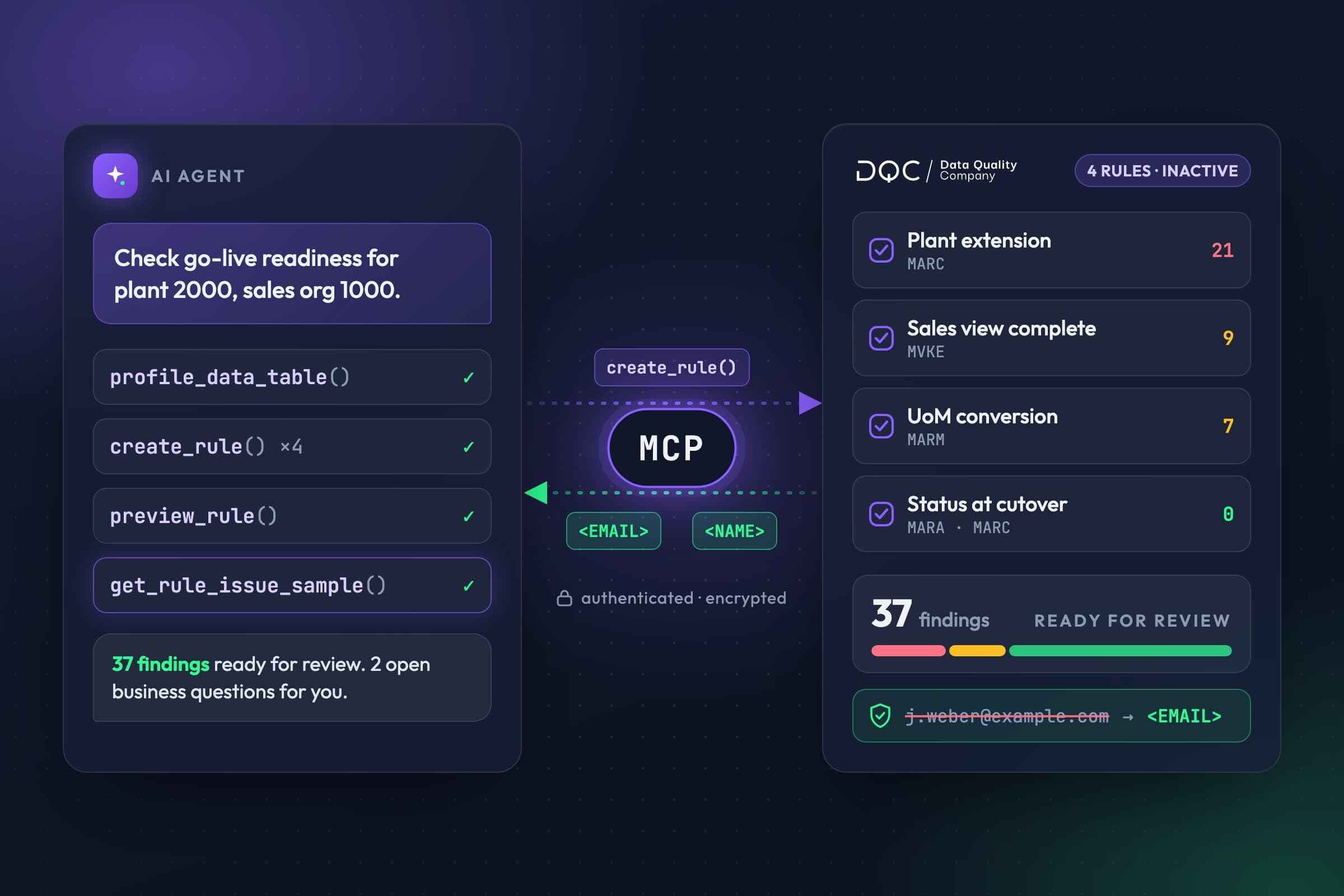
Less routine work. More time for decisions that need your expertise. With DQC through MCP, your AI agent analyzes data, creates rules, runs checks, and prepares improvements, giving you more time and capacity as a data steward.
Another data source connected. Another SAP module scheduled for migration. As a data steward, your list keeps growing: more tables, more rules, more issues to investigate. Each needs attention. You need to understand the data, define the right check, evaluate the results, and decide what happens next.
With DQC’s new MCP access, your own AI agent can handle many of these steps on the platform. You describe the task. The agent uses DQC’s capabilities to carry it out and brings the results back for review.
SAP material master: can we ship after go-live?
Imagine a manufacturer moving part of its product range to delivering plant 2000 as part of an S/4HANA migration. As a data steward, you need to establish whether the materials in scope can be sold through sales organization 1000 and distribution channel 10, and delivered from that plant after go-live.
General material data, plant data, sales data, and units of measure all need to align. In this example, DQC has a prepared validation view combining MARA, MARC, MVKE, and MARM, along with the planned material, plant, and sales assignments and the approved status rules from your SAP Customizing.
Your request to the agent could look like this:
Check the materials in scope for go-live for sales organization 1000, distribution channel 10, and delivering plant 2000. Find missing plant or sales views, mismatched delivering plants, status restrictions effective at cutover, deletion flags, and missing or invalid conversions between sales and base units of measure. Apply our target assignments and status rules. Create suitable checks and test them on the sample. For each finding, show the affected material and organizational combination and the cause. Flag any open business questions.
With the appropriate permissions, the agent can turn this into several related checks:
Find missing extensions. Compare the target assignments with existing plant and sales views. This also reveals materials for which a required record is missing entirely.
Assess restrictions in context. Check status and deletion flags at the relevant organizational levels. Whether a status blocks the intended process depends on your status rules and its effective date. SAP considers multiple status levels together.
Validate units of measure correctly. Check the required conversion when the sales unit differs from the base unit. An empty sales unit is not an error in itself: SAP then uses the base unit of measure.
Deliver reviewable rules and findings. Create the checks in DQC, using custom SQL where needed, and test them on a sample. Findings include the affected combinations and the condition each one violates.
One possible finding: a material has the intended sales view and references plant 2000, but has never been extended to that plant. A check for populated fields in MARA would miss this gap.
You work with sales and logistics to determine whether the plant extension is missing or the target assignment needs correcting. After your review, the agent can activate the selected rules and run them across the full defined data scope. A migration check becomes reusable monitoring. The agent handles the laborious comparisons and rule preparation; you decide on the right business resolution.
Give your agent access to DQC
MCP, the Model Context Protocol, is an open standard that lets AI applications call external tools. DQC uses it to make data quality capabilities available to your agent. You access them through a compatible AI client or your own agent workflow, describing tasks in natural language.
These capabilities cover the work from initial profiling through data improvement:
Create and update rules: including custom SQL and Python rules, with filters for the relevant data scope.
Run checks: execute rulesets, monitor their status, and retrieve results.
Investigate issues: inspect failed rules, issue counts by quality dimension, and available flagged rows.
Profile data: retrieve column statistics and correlations, or request fresh profiling.
Prepare and run improvements: configure improvement workflows, inspect previews, and retrieve results.
A major reduction in the data steward’s workload
This lets you incorporate DQC into the agent workflows you already use. The agent takes over the repetitive work of configuring checks, monitoring progress, and gathering results. That takes a substantial burden off data stewards: fewer manual steps and less switching between screens free up time to investigate root causes, work with business teams, and resolve the data issues that matter most.
You can tackle additional tables and new questions while your agent executes the workflows you have delegated. Your expertise goes where it makes the greatest difference: understanding business context, setting priorities, and making decisions.
Secure MCP access: PII protection before data reaches the LLM
The MCP connection follows the DQC platform’s security principles: authenticated access over an encrypted connection, with permissions checked for each operation. Read and write access are authorized separately. The agent can only access data and actions permitted for the user account it operates under.
MCP access also uses the platform’s shared PII protection. Detected personal information, such as names, email addresses, or phone numbers, is replaced with placeholders or masked on the server before the response is passed to the AI client and its LLM. For these values, the LLM receives the replacement representation. This applies to outputs including samples, issue rows, and values in profiling results.
Data quality checks continue to run against the underlying data. The replacement protects the output sent to the agent; it does not change stored source data. If the required PII protection component is unavailable, the corresponding MCP data access is blocked.
New rules are created as inactive. That gives you a clear review point between drafting and activation. Define which actions require approval in your agent workflow, such as activating a rule or starting an improvement workflow. Use an AI client approved by your organization, with the appropriate data processing settings.
Start with a specific business question
Choose a relevant business process and the data available for it in DQC. Give your agent the business requirements and ask it to prepare suitable rules with initial findings. Review the result, then extend the workflow to the next tasks you want to delegate.
You set the priorities. Your agent handles the execution in DQC.